We’ll get to the thorny issue of dates in a moment, but first let’s look at a little timer function to time your code.
Timing
The most basic form of profiling (as covered in the previous tutorial) is just timing how long different parts of your code take. It’s not too hard to do this in Python:
import timeimport numpy as npn =5_000start = time.time()zeros = np.zeros((n,n))zeros_time = time.time()rand = np.random.rand(n,n)rand_time = time.time()print(f'Time to make zeros: {(zeros_time - start):n} s')print(f'Time to make random numbers: {(rand_time - zeros_time):n} s')
Time to make zeros: 5.67436e-05 s
Time to make random numbers: 0.0788257 s
As you probably could’ve guessed, in Sciris there’s an easier way, inspired by Matlab’s tic and toc:
import sciris as scT = sc.timer()T.tic()zeros = np.zeros((n,n))T.toc('Time to make zeros')T.tic()rand = np.random.rand(n,n)T.toc('Time to make random numbers')
Time to make zeros: 73.9 μs
Time to make random numbers: 78.4 ms
We can simplify this even further: we often call toc() followed by tic(), so instead we can just call toctic() or tt() for short; we can also omit the first tic():
T = sc.timer()zeros = np.zeros((n,n))T.tt('Time to make zeros')rand = np.random.rand(n,n)T.tt('Time to make random numbers')
Time to make zeros: 91.6 μs
Time to make random numbers: 80.6 ms
You can also use sc.timer() in a with block, which is perhaps most intuitive of all:
with sc.timer('Time to make zeros'): zeros = np.zeros((n,n))with sc.timer('Time to make random numbers'): rand = np.random.rand(n,n)
Time to make zeros: 57.2 μs
Time to make random numbers: 80.0 ms
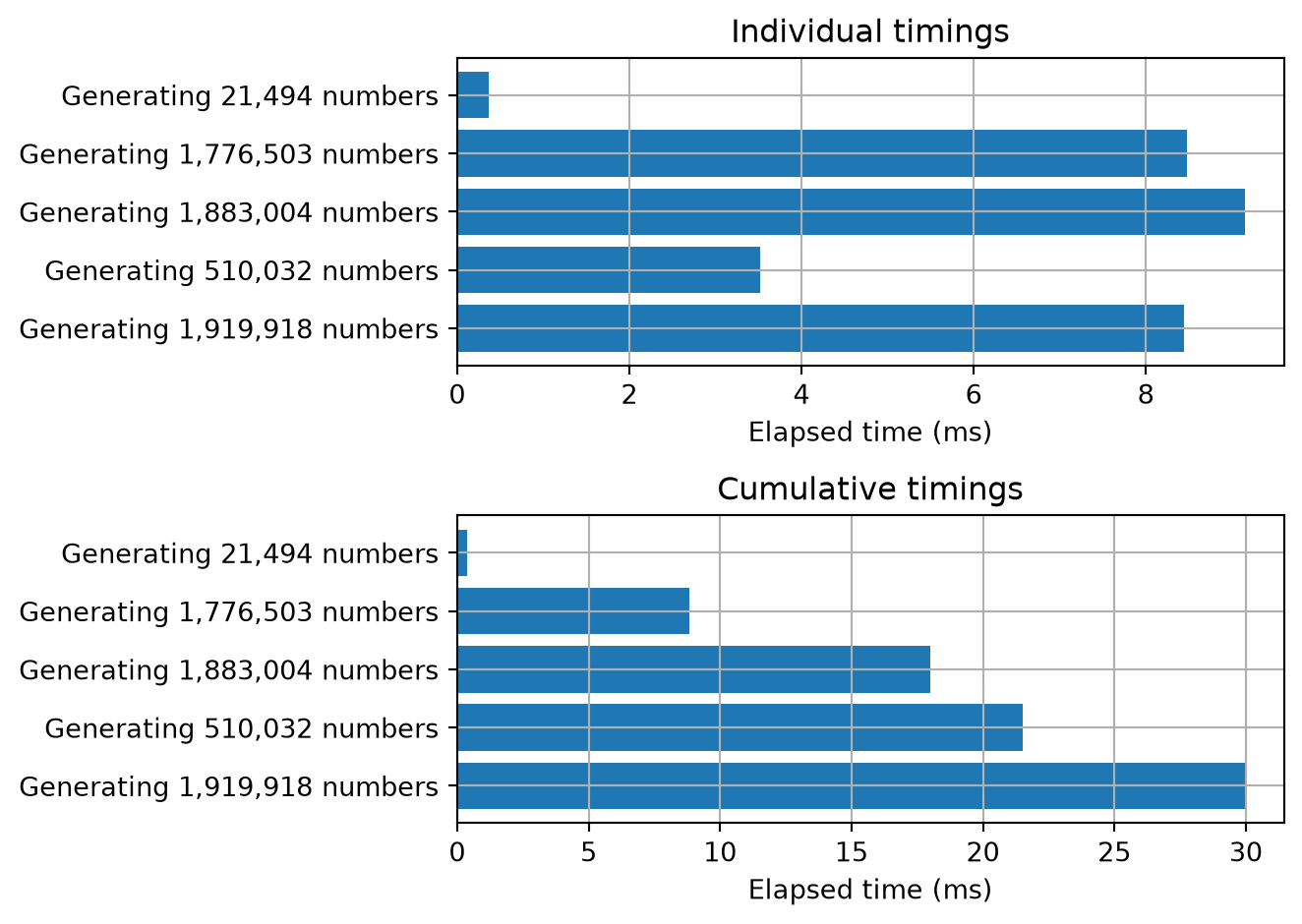
If we have multiple timings, we can also do statistics on them or plot the results:
T = sc.timer()for i inrange(5): rnd = np.random.rand(int((i+1)*np.random.rand()*1e6)) T.tt(f'Generating {len(rnd):,} numbers')print('mean', T.mean())print('std', T.std())print('min', T.min())print('max', T.max())T.plot();
Generating 30,132 numbers: 0.314 ms
Generating 1,973,256 numbers: 7.24 ms
Generating 1,260,150 numbers: 4.72 ms
Generating 2,413,334 numbers: 8.27 ms
Generating 4,169,201 numbers: 14.3 ms
mean 0.0069599151611328125
std 0.004566479412392933
min 0.0003139972686767578
max 0.014259576797485352
Sleeping
For completeness, let’s talk about Sciris’ two sleep functions. Both are related to time.sleep().
The first is sc.timedsleep(). If called directly it acts just like time.sleep(). But you can also use it in a for loop to take into account the rest of the time taken by the other operations in the loop so that each loop iteration takes exactly the desired amount of time:
import numpy as npfor i inrange(5): sc.timedsleep('start') # Initialize n =int(np.random.rand()*1e6) # Variable computation timefor j inrange(n): tmp = np.random.rand() sc.timedsleep(0.3, verbose=True) # Wait for 0.3 seconds per iteration including computation time
Pausing for 0.160421 s
Pausing for 0.227085 s
Pausing for 0.227374 s
Pausing for 0.142772 s
Pausing for 0.297681 s
The other is sc.randsleep(), which as the name suggests, will sleep for a random amount of time:
for i inrange(4):with sc.timer(f'Run {i}', unit='ms'): sc.randsleep(0.2) # Sleep for an average of 0.2 s, but with range 0-0.4 s
Run 0: 247 ms
Run 1: 318 ms
Run 2: 277 ms
Run 3: 386 ms
Dates
There are lots of different common date formats in Python, which probably arose through a process like this. Python’s built-in one is datetime.datetime. This format has the basics, but is hard to work with for things like plotting. NumPy made their own, called datetime64, which addresses some of these issues, but isn’t compatible with anything else. Then pandas introduced their own Timestamp, which is kind of like a combination of both.
You will probably be relieved to know that Sciris does not introduce a new datetime format, but instead tries to make it easier to work with the other formats, particularly by being able to easily interconvert them. Sciris provides shortcuts to the three common ways of getting the current datetime:
sc.time() # Equivalent to time.time()
1793327288.1100078
sc.now() # Equivalent to datetime.datetime.now()
datetime.datetime(2026, 10, 30, 2, 28, 8, 114064)
sc.getdate() # Equivalent to datetime.datetime.now().strftime('%Y-%b-%d %H:%M:%S')
'2026-Oct-30 02:28:08'
Sciris’ main utility for converting between date formats is called sc.date(). It works like this:
sc.date('2022-03-04')
datetime.date(2022, 3, 4)
It can interpret lots of different strings, although needs help with month-day-year or day-month-year formats: